Gala auction with mobile bidding: guests bid by phone, the room follows on a big screen
By Gerrit-Jan Bogert, Founder of Hameriq ·
At a gala dinner the auction competes with the food, the speeches and the conversation at the table. Mobile bidding brings the auction to where the guests are: on their phone, at their seat. A big screen in the room shows every new bid, so the whole room can see the auction moving. This article explains how it works and how to prepare.
Written by the team behind Hameriq. Hameriq is our own product, so we mention it where it fits; everything else in this article applies whichever software you use.
Why mobile bidding raises more
With paper bid sheets guests have to get up, find the table and write down a bid, and they only see they were outbid if they walk back. With mobile bidding they bid from their seat in a few seconds and get a message the moment someone else bids higher.
That makes it easy to bid again. Automatic bidding helps too: a guest enters a maximum once and the system bids for them, step by step, up to that amount. The auction keeps moving even while guests are eating or listening to a speech.
How it works for your guests
Guests do not need to install an app. They scan a QR code and bid in their browser.
- Scan the QR code on the table card or the big screen
- Register once with name and e-mail, or sign in
- Open a lot and place a bid, or set a maximum and let the system bid
- Get a message when someone else bids higher
- Receive a payment link by e-mail when you win
The live screen in the room
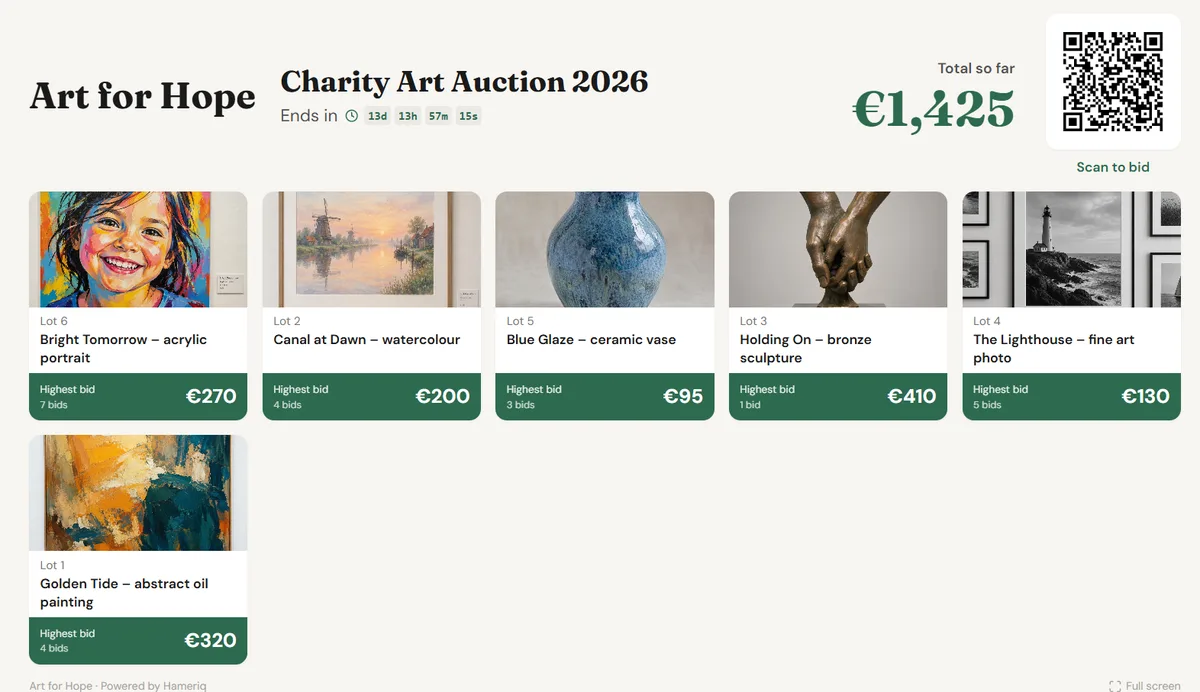
A TV or projector shows the auction live: the lots with photos and their highest bids, a running total of everything raised so far and a large QR code to bid. The lot with the latest bid moves to the front and its price lights up, so guests immediately see where the action is.
Bidders' names are not shown by default; guests who want to can choose to appear with their first name, full name or a screen name. On Hameriq the live screen is included for every auction house: open it from the dashboard and put it in full screen on the TV.
Before the evening
Most of the work happens before the event. A short checklist:
- Put all lots online with a photo, a short description and the value
- Open the auction a week before the gala so guests can already bid from home
- Print the QR code on table cards and in the programme
- Test the Wi-Fi in the room and the screen or projector
- Ask the host to mention the auction and the QR code at the start
- Decide who answers questions from guests during the evening
During the evening
Let the host point to the screen a few times: when a top lot gets a new bid, when the total passes a milestone or just before the auction closes. Those moments create energy in the room.
Keep the screen simple and visible from every table. A few things that help:
- Show the screen from the start of the evening
- Announce the closing time clearly and repeat it
- Celebrate milestones in the total out loud
- Thank donors of the lots by name
Closing the auction
Closing all lots at the same minute creates a rush and frustration. With staggered closing the lots close one after another, for example one per minute, so guests can follow the final minutes of each lot.
A late bid extends the lot: on Hameriq a bid in the last two minutes adds two minutes, so nobody wins by placing a bid in the final second. Every lot ends when the bidding has really stopped.
After the gala: payment and pick-up
Winners receive an e-mail with a payment link and can pay by card, Bancontact, iDEAL or SEPA. With Hameriq the money goes straight to the organisation's own Mollie or Stripe account, with 0% commission.
Organisers get a pick list per winner, so handing over the lots at the end of the evening or later goes quickly. Lots that need shipping can get a shipping label straight from the dashboard.
What to look for in gala auction software
Whichever software you choose, check these points before the evening:
- Bidding in the browser via a QR code, without an app
- A live screen with the latest bids and a running total
- Automatic bidding and messages when guests are outbid
- Staggered closing and late-bid extension
- Payments directly to your own account and data stored in the EU
See it working in the demo
Open the demo auction, place a bid on your phone and watch the live screen update. Open the demo
Frequently asked questions
Do guests need to install an app to bid?
Not with Hameriq: guests scan a QR code and bid in their browser on any phone.
What do I need for a live screen at a gala?
A TV or projector with a laptop or smart TV that can open a web page, and a stable internet connection. Open the live screen from the dashboard and switch to full screen.
Are bidders' names shown on the screen?
No. The live screen never shows names. In the bid history on the website bidders stay anonymous unless they choose to show their first name, full name or a screen name.
Can guests who are not at the gala bid too?
Yes. The auction is online, so you can open it days before the event and people at home can bid alongside the guests in the room.
What does mobile bidding cost?
Prices differ per provider. Hameriq is free for recognised charities, including mobile bidding and the live screen; companies and auction houses receive a quote.